How to Change/Update Domain Nameservers

Visit your client area/dashboard by login into your hosting account on Geebytescloud.com

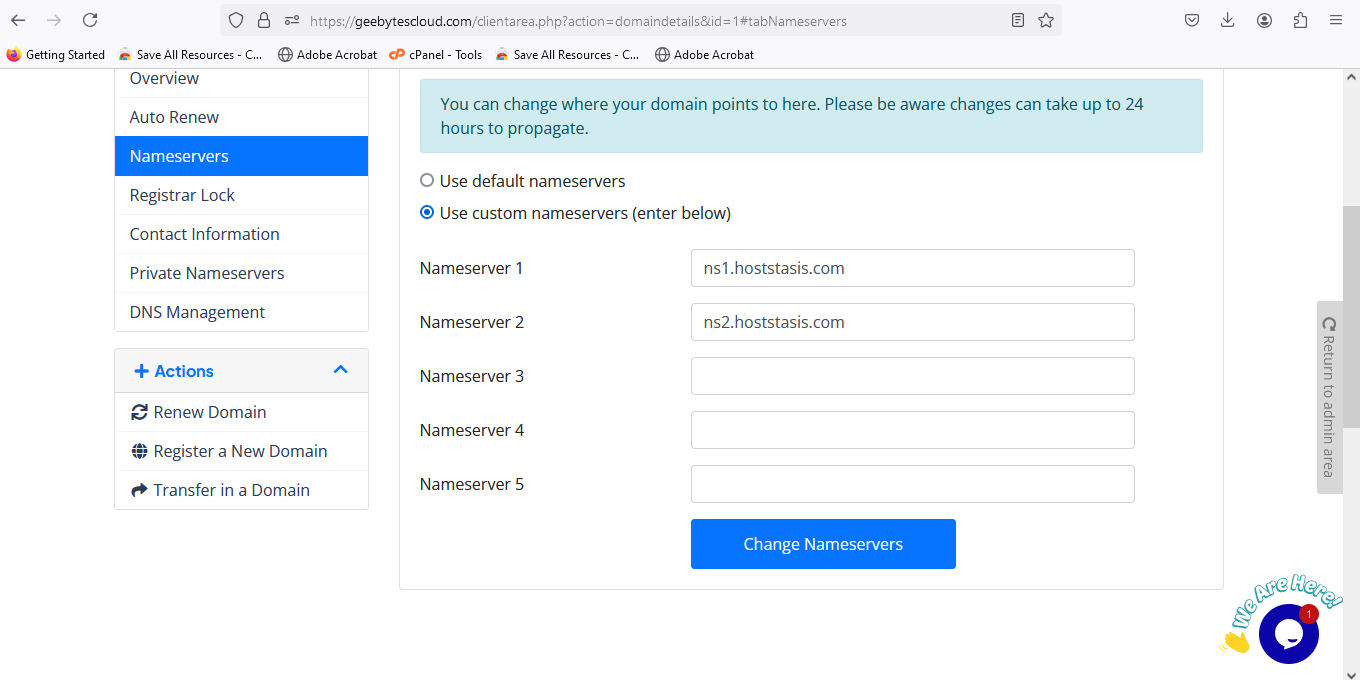
When you are logged in, click on the Domains menu and click the click on the domain you want to change the nameserver and click on nameserver. enter the nameserver you wishe to change to and save changes
  • 0 用戶發現這個有用
這篇文章有幫助嗎?

相關文章

How to Register Personal Nameservers for Domain

To register your personal Nameservers for your domain as a reseller, simply follow the below...

What is the difference between addon domain and subdomain

An addon domain is a domain name that points to its own folder within public_html and appears...

Domain Transfer Refused - "Domain is not Eligible for Transfer"

Domain Transfer Refused - "Domain is not Eligible for Transfer" A domain will display as...

How to Create an Addon Domain in cPanel

How to Create an Addon Domain in cPanel Important Note You cannot use an addon domain in...

How to Create a Sub-Domain in cPanel

How to Create a Sub-Domain in cPanel? 1. Log into your cPanel account.   2. In the...