How to suspend or unsuspend cpanel account on WHM

How to Suspend an Account in WHM

This tutorial shows you how to suspend an account in WHM (WebHost Manager). Account suspension is one of the main functions you
will use as a hosting reseller.

What you’ll need

Before you begin this guide you’ll need the following:

  • Access to your account’s WHM

Step 1 — Navigating to Manage Account Suspension Section

Log in to your WHM and from the WHM’s menu select Manage Account Suspension. This option is located under Account Functions section. You can also simply type suspension in the search field of WHM for quick access:
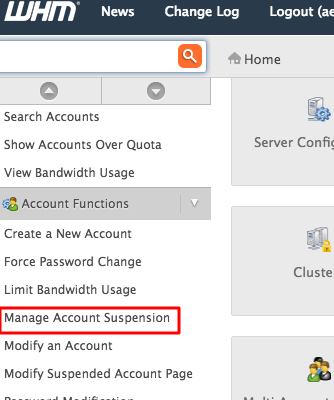
Navigating to Manage Account Suspension

Step 2 — Selecting an Account to Suspend

You can select an account by its username or domain name. Optionally, you can provide a reason for suspension. If provided, it will appear on the List Suspended Accounts section of WHM. Once you have selected an account, click Suspend:
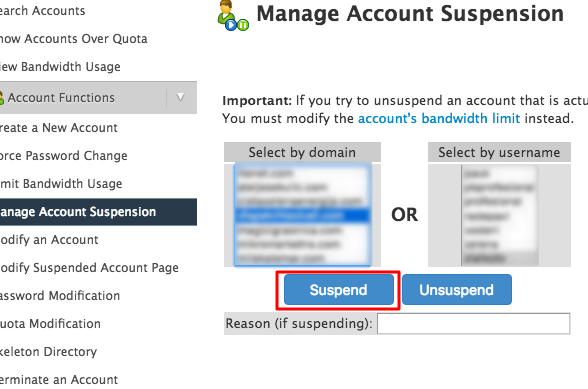
Suspending an account in WHM

  • 0 Пользователи нашли это полезным
Помог ли вам данный ответ?

Связанные статьи

How to Create Sub or add-on Domain

Step 1: Login to your cpanel and Navigate to Domain Section  1. In the cPanel dashboard, scroll...

How to Reset my cPanel Account Password

If you can access your cPanel account, follow these steps to reset your password, if can't access...

How to upload files via the cPanel FileManager

Here is a detailed step-by-step procedure for uploading a file in cPanel using the File Manager,...

Creating Cpanel from WHM Account

  How To Create A New cPanel in WHM - cPanel Setup If you would like to have more than one...

How to Edit file in the cPanel File Manager

How to Edit file in the cPanel File Manager? 1. Log into your cPanel account. 2. In the...